labconsole status --all
One platform for the whole class
Most virtual training runs on a pile of tools taped together: a meeting app for voice and slides, a lab setup somewhere else, and a login for each. LabConsole is what you get when the classroom is designed as one system instead.
labconsole tour --chapters
Three and a half minutes, both sides of the room
Recorded from the instructor's grid and from a student's seat: every screen at once, help in one click, the presentation stage, then a class joined, set up and repaired. Captions are on; pick a chapter to jump.
The heart of LabConsole: a live wall of every student's screen. You see the whole room the way you would from the back of a physical classroom - who is on step 3, who is three steps behind, whose terminal has been idle for ten minutes.
- Every student's live screen, updating in real time
- One-click assist: your keyboard and mouse on their actual machine
- Presence and progress cues without asking "is everyone with me?"
Full KVM virtual machines. Students can break the network, recompile the kernel, and reboot, because each one has a private lab on its own network.
- Any x86 operating system - Linux, BSD, Windows, appliances
- Multi-VM labs per student: several private networks, multi-homed machines, IPv4 and IPv6
- Consoles in the browser; snapshot and restore when a lab goes sideways
Teaching happens in the same window as the labs. Present the material, talk to the class, run a timed exercise, and share any machine's screen - without sending anyone to a second app.
- Synchronized PDF presentation with a laser pointer
- Built-in instructor audio and camera video
- Countdown timers, chat, and live student feedback
If you ship an appliance, your training environment already exists - it is the OVA on your download page. Upload it and LabConsole turns it into a classroom template automatically.
- Direct OVA upload with automatic conversion to KVM
- Reusable templates: every student launches a private copy
- Or build images from scratch on standard OS bases
labconsole grid --legend
Reading a card
Every student is one card. The header colour says whether they are working, the chips say what is happening right now, and the thumbnail is their actual screen - click it and you are on their machine.
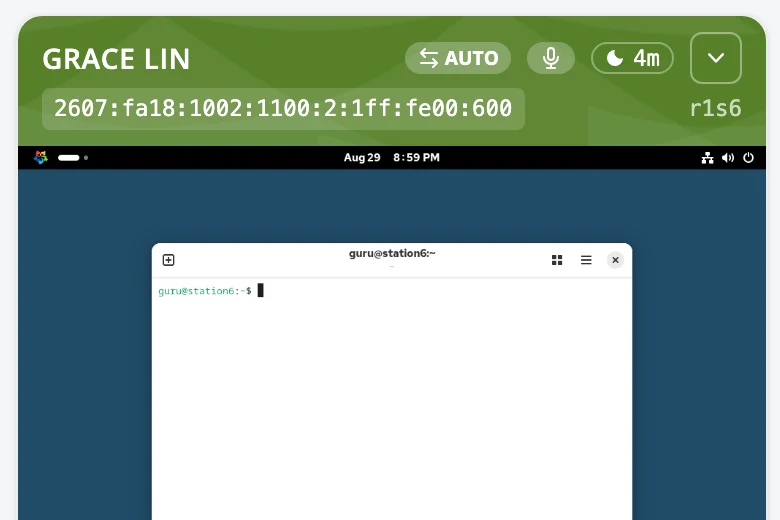
- Header colour. Green: connected and working. Dark green: connected but idle. Gray: powered off, or nobody has joined that seat yet. Red: the machine reported an error.
- 4m
- Idle pill. How long since that student's last keystroke or click. It appears after a couple of quiet minutes and keeps counting - the "who is stuck?" signal, without asking.
- AUTO
- Face mode. While the class has cameras, a card flips to that student's camera when they talk and back to their screen when they stop. Click it to lock a card to the camera or the screen.
- Mic and camera badges. Their microphone is live (instructors click it to mute) and their camera is on.
- Raised hand. A student asked for help, or answered a quick yes / no / faster / slower from the presentation - it sits on their card until you dismiss it.
- on stage
- On stage. This machine's screen is being shared to every student right now.
- r1s6
- Machine id and address. The seat's short id (room 1, seat 6) and the machine's live address, for when a student reads it out loud.
labconsole api --agent-ready
Automate the whole class
Everything an instructor can click is also an API call: create rooms, add machines, schedule power, snapshot labs, drive the presentation. A built-in MCP server exposes the same verbs to AI agents - among the training-lab platforms we reviewed, we found none that documents one.
labconsole join --code 7X4-KQ2
Nothing for students to set up
Students join with an access code in any modern browser. No accounts to create, no client to install, no VPN profile to import. The first lab is on screen in seconds.
labconsole billing --rates
Pricing you can read
Published plans from $249/mo with a meter you forecast from students and class days - no sales call required. The full rate card and a class calculator are public.
See pricing$ labconsole request-access
See it with your own class material
Request access and we will help you bring a real course - images, PDF deck and all - into a guided pilot.